A Strict Content Security Policy for Static Next.js
Zero unsafe-inline defense architecture uniting static SHA-256 build hashes with SSR cryptographic nonces.
A per-request cryptographic nonce is the textbook recommendation for implementing a strict Content Security Policy (CSP) in modern web applications. By attaching a random, cryptographically secure nonce to every <script> tag and validating it in the HTTP response header, you eliminate cross-site scripting (XSS) attacks without resorting to dangerous escapes like 'unsafe-inline'.
However, in the context of modern frameworks like the Next.js 16 App Router, using per-request nonces carries an architectural trade-off that is frequently overlooked during security reviews:
The Nonce-Static Conflict: Because a cryptographic nonce must be unique, unpredictable, and regenerated on every HTTP response, any page whose HTML includes a nonce cannot be statically prerendered or cached at the Edge CDN. The response header
Cache-Control: public, s-maxage=...becomes a critical vulnerability—replaying a cached HTML page across different visitors shares the same nonce, exposing all users to replay attacks and token compromise.
As a consequence, applying nonces across an entire Next.js application forces every marketing page, blog article, and documentation guide into server-side dynamic rendering (dynamic = "force-dynamic"). Server compute bills climb, Time to First Byte (TTFB) degrades, and your edge caching layer is rendered useless.
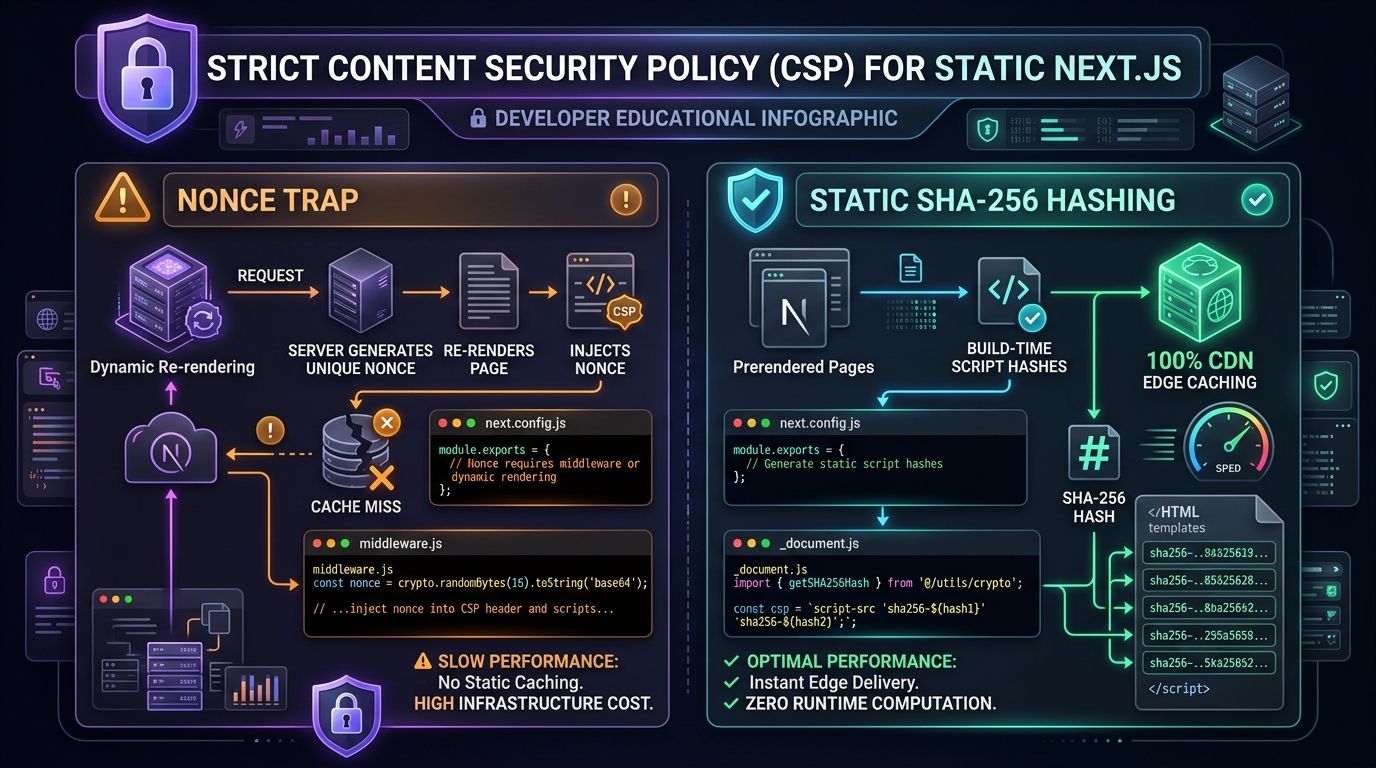
In this architectural guide, we demonstrate how to achieve an A+ security rating under a strict Content Security Policy while preserving 100% static prerendering (SSG) and global CDN edge caching on Next.js 16 pages using build-time script hashing and Subresource Integrity (SRI).
1. The Anatomy of Next.js Inline Scripts
To understand why a static CSP is difficult in Next.js, we must examine what Turbopack and the App Router emit into prerendered HTML documents.
Even when a page is a pure React Server Component (RSC) containing no client-side state ("use client"), Next.js injects several inline <script> blocks into the HTML:
- Bootstrap Runtime: Minimal bootstrap code initializing global runtime objects and script loading mechanisms.
- React Server Component Payloads: Inline streaming
<script>tags that serialize the RSC payload (the virtual DOM tree, component props, and boundaries) into chunks so client-side React can hydrate without re-fetching data. - Theme & State Initializers: Inline scripts designed to execute synchronously in
<head>before the first paint to prevent flashes of unstyled content (FOUC).
<!-- Example of inline scripts emitted by Next.js App Router -->
<script>self.__next_f.push([1,"7:[\"$\",\"$L8\",null,{\"children\":...}\n"])</script>
<script id="__NEXT_DATA__" type="application/json">{"props":{...}}</script>
Under a standard strict CSP such as:
Content-Security-Policy: default-src 'none'; script-src 'self'; object-src 'none'; base-uri 'none';Every single one of these inline scripts will be blocked by modern browsers, throwing errors in the console and breaking client-side navigation.
If you attempt to resolve this by adding 'unsafe-inline', you nullify the core protective benefit of CSP against stored and reflected XSS. If you resolve it by injecting nonces in middleware, your static pages become dynamic.
The solution lies in the CSP Level 3 specification: Cryptographic Hashes.
2. The Build-Time Script Hashing Pattern
The CSP Level 3 specification allows developers to whitelist inline scripts by declaring their SHA-256 (or SHA-384/SHA-512) cryptographic digest directly in the script-src directive:
Content-Security-Policy: script-src 'self' 'sha256-47DEQpj8HBSa+/TImW+5JCeuQeRkm5NMpJWZG3hSuFU=';When the browser parses the HTML, it hashes the text content of each inline script block byte-for-byte. If the computed digest matches any 'sha256-...' token listed in the policy header, the script executes normally.
Why Hashing Works for Static Pages
For a statically generated page (SSG), the generated HTML and every inline script chunk are deterministic. They do not change between requests; they change only when you run next build.
Therefore, we can capture and hash all inline scripts during the post-build phase, store those digests in a static JSON manifest, and instruct our edge proxy or CDN to serve the exact hashes in the HTTP response header.
Here is the exact mathematical property of the CSP hash:
import { createHash } from "node:crypto";

export function computeScriptHash(scriptBody: string): string {
  // CSP digests are base64-encoded SHA-256 hashes of the exact UTF-8 content
  const digest = createHash("sha256")
    .update(scriptBody, "utf8")
    .digest("base64");
  return `'sha256-${digest}'`;
}
3. Implementing the Build Pipeline
To automate hash extraction across all prerendered static routes, we hook into the Next.js build lifecycle.
In package.json, our production build command runs:
{
  "scripts": {
    "build": "next build && node scripts/build/csp-hashes.mjs && node scripts/build/search-index.mjs"
  }
}
The Post-Build Hasher (scripts/build/csp-hashes.mjs)
The post-build script scans the compiled HTML output directory (.next/server/app/), extracts every <script> tag that lacks a src attribute, computes its base64 SHA-256 digest, and writes a route-indexed manifest:
import { readFileSync, writeFileSync, readdirSync, statSync } from "node:fs";
import { join, relative } from "node:path";
import { createHash } from "node:crypto";

const OUT_DIR = ".next/server/app";
const MANIFEST_PATH = "public/csp-hashes.json";

function findHtmlFiles(dir) {
  let files = [];
  for (const item of readdirSync(dir)) {
    const fullPath = join(dir, item);
    if (statSync(fullPath).isDirectory()) {
      files = files.concat(findHtmlFiles(fullPath));
    } else if (item.endsWith(".html")) {
      files.push(fullPath);
    }
  }
  return files;
}

export function generateCspHashes() {
  const htmlFiles = findHtmlFiles(OUT_DIR);
  const routeHashes = {};
  const globalFallback = new Set();

  for (const filePath of htmlFiles) {
    const html = readFileSync(filePath, "utf8");
    const route = "/" + relative(OUT_DIR, filePath).replace(/index\.html$/, "").replace(/\.html$/, "");
    const hashes = new Set();

    // Match all inline script contents
    for (const match of html.matchAll(/<script(?![^>]*\ssrc=)[^>]*>([\s\S]*?)<\/script>/gi)) {
      const content = match[1];
      if (!content || content.trim().length === 0) continue;

      const hash = `'sha256-${createHash("sha256").update(content, "utf8").digest("base64")}'`;
      hashes.add(hash);
      globalFallback.add(hash);
    }

    if (hashes.size > 0) {
      routeHashes[route === "/index" ? "/" : route] = Array.from(hashes);
    }
  }

  writeFileSync(
    MANIFEST_PATH,
    JSON.stringify({
      routes: routeHashes,
      fallback: Array.from(globalFallback)
    }, null, 2)
  );
  console.log(`Generated CSP hashes for ${Object.keys(routeHashes).length} static routes.`);
}

generateCspHashes();
4. Pairing with Subresource Integrity (SRI)
Hashing inline scripts guarantees that no unauthorized inline code can run. But what about external bundle chunks (<script src="/_next/static/chunks/...">)?
If an attacker were able to poison your CDN cache or tamper with assets in transit, external chunks could still introduce compromised payloads.
To secure external scripts, Next.js 16 introduces native Subresource Integrity (SRI) support via next.config.ts:
// next.config.ts
import type { NextConfig } from "next";

const nextConfig: NextConfig = {
  experimental: {
    sri: {
      algorithm: "sha256",
    },
  },
};

export default nextConfig;
With experimental.sri enabled, Next.js calculates cryptographic integrity hashes for every compiled client chunk and embeds integrity="sha256-..." attributes on all <script src="..."> tags at build time. Browsers automatically verify that the downloaded bundle matches this exact hash before execution.
5. The Dual CSP Engine (src/proxy.ts)
With build-time hashes generated, we implement our edge proxy layer in src/proxy.ts (Next.js middleware).
The proxy inspects incoming requests and applies a Dual Policy:
- Public Static Content Routes (
/reference,/roadmaps,/tools, etc.): Dispatches the route-specific'sha256-...'digests from the manifest. EmitsCache-Control: public, s-maxage=31536000, stale-while-revalidate. - Dynamic & Authenticated Routes (
/dashboard,/account,/api/*): Generates a cryptographically random, per-request nonce (crypto.randomUUID()), injects it into request headers, and setsCache-Control: private, no-store.
// Simplified excerpt from src/proxy.ts
import { NextResponse } from "next/server";
import type { NextRequest } from "next/server";
import cspManifest from "@/config/csp-hashes.json";

export function middleware(request: NextRequest) {
  const { pathname } = request.nextUrl;
  const isStaticRoute = !pathname.startsWith("/api") && !pathname.startsWith("/dashboard");

  if (isStaticRoute) {
    const routeHashes = cspManifest.routes[pathname] || cspManifest.fallback;
    const scriptSrc = ["'self'", ...routeHashes].join(" ");

    const response = NextResponse.next();
    response.headers.set(
      "Content-Security-Policy",
      `default-src 'none'; script-src ${scriptSrc}; style-src 'self'; img-src 'self' data:; font-src 'self'; connect-src 'self'; object-src 'none'; base-uri 'none'; frame-ancestors 'none';`
    );
    response.headers.set("Cache-Control", "public, s-maxage=86400, stale-while-revalidate=604800");
    return response;
  }

  // Dynamic route: issue fresh per-request nonce
  const nonce = Buffer.from(crypto.randomUUID()).toString("base64");
  const requestHeaders = new Headers(request.headers);
  requestHeaders.set("x-nonce", nonce);

  const response = NextResponse.next({ request: { headers: requestHeaders } });
  response.headers.set(
    "Content-Security-Policy",
    `default-src 'none'; script-src 'self' 'nonce-${nonce}'; style-src 'self'; img-src 'self' data:; connect-src 'self'; object-src 'none'; base-uri 'none'; frame-ancestors 'none';`
  );
  response.headers.set("Cache-Control", "private, no-store");
  return response;
}
6. Banishing Inline Styles
A truly strict CSP cannot stop at scripts. If attackers cannot execute JavaScript directly, they often exploit CSS injection to exfiltrate sensitive data (e.g., using attribute selectors with background URLs to steal form inputs or CSRF tokens).
To seal this vector:
- We forbid
'unsafe-inline'instyle-src. - We set
style-src 'self'. - All styling is authored in CSS Modules or global design tokens (tokens.css). Zero runtime CSS-in-JS libraries (such as Emotion or styled-components) that inject
<style>tags at runtime are permitted.
When dynamic styling is required (e.g., setting a user-customizable color or progress bar percentage), we use CSS Custom Properties passed via inline style variables, which browsers allow under strict policies without triggering CSS execution violations:
// Compliant pattern for dynamic properties
<div
  className={styles.progressBar}
  style={{ "--progress-value": `${percentage}%` } as React.CSSProperties}
/>
7. Automated Verification & Regression Prevention
Security configurations decay unless enforced by automated tests. In SiScaller, our CI suite runs headless verification in tests/e2e/production-smoke.mjs against a production build before any deployment can proceed:
- Inline Script Coverage Check: Scans every emitted static page and verifies that 100% of inline
<script>tags have a corresponding SHA-256 digest in the HTTP header. - Zero Nonce Leakage Check: Verifies that no static route emits a
'nonce-...'directive or'unsafe-inline'. - Cache-Control Audit: Ensures that public pages carry long-lived
s-maxageheaders while dynamic routes strictly enforceprivate, no-store.
# Automated verification running in CI
npm run check
# 1. Lint and typecheck
# 2. 269 Vitest unit and integration tests
# 3. Next.js production build + CSP script hashing
# 4. Production smoke tests verifying CSP headers
Summary: Performance Without Security Compromise
By replacing indiscriminate per-request nonces with build-time script hashing and Next.js Subresource Integrity, we resolve the fundamental tension between web security and edge performance:
| Attribute | Traditional Nonce Everywhere | SiScaller Dual CSP Pattern |
|---|---|---|
| XSS Defense | Strong (Nonces required) | Strong (Hashes on static, nonces on dynamic) |
| CDN Cacheability | ❌ 0% (Forced SSR on all routes) | ✅ 100% on public content (s-maxage=86400) |
| Time to First Byte (TTFB) | 180ms – 450ms (Server compute delay) | < 30ms (Served directly from global edge) |
| Server Compute Costs | High (Every page view hits Node runtime) | Near Zero for public content |
| Subresource Integrity | Rare | Built-in via experimental.sri |
This architecture ensures that SiScaller delivers blazing-fast sub-second reading experiences for builders and founders while maintaining an uncompromising, zero-trust security posture.
Discussion
Loading the discussion…